There are a lot of websites on the Internet that provides free sms services but only handful of them allows you to send Sms without registration and anonymously. In this post I will review the services of 4 sms websites that allows you to send Anonymous messages.

Showing posts with label Mobile Hacking. Show all posts
Showing posts with label Mobile Hacking. Show all posts

Reset Your Mobile Memory Card Password 2 minutes

We usually set password for our memory card for privacy and security, but the common mistake every one does at least once in out life time forgetting password. If you set password for mobile memory card, then you should be not forget the password. If you does then the only option is to formate your memory card with the help of the card reader and eventually the loss of all your data stored on it. There is a way to break the security wall. If you are a Symbian device lover then no need to worry about the password. You can crack them in few minutes.
App To Kill, Terminate A Running Program On Android Phones

Have you noticed that the battery performance of your android phone gets reduced when you download third party apps ? Well it happens because some applications keep running in the background when you return to the homepage or switch another application, this happens because a lot of android application do not have a close button. Like calendar, notepad and other apps which notify you on certain events periodically run in the background and deplete your cell phone battery. Also there are apps that start running when you start up your phone without your knowledge.
Hack and Play N-Gage 2.0
It is imperative that you hack your phone to be able to play N-Gage with its cr@cked games. Here is what is to be done:
1. First download AppTRK (package
1. First download AppTRK (package
included ) and install the appropriate version for your phone.
Version history:
Pre-FP1 devices:Nokia N77 , E61i, E65, N93i, N91 8GB, E62, E50, 5500, N93, N73, N80, N71, N92, E70, E60, E61, 3250.
FP1 devices: Nokia 6124 classic, N82, N95-3 NAM, E51, N95 8GB, N81, N81 8GB, 6121 classic, 6120 classic, 5700 XpressMusic, 6110 Navigator, E90 Communicator, N76, 6290, N95.
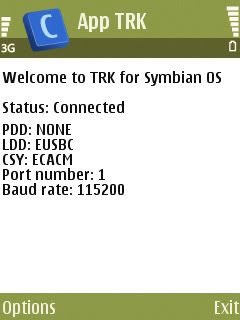
2. I presume so already have Nokia PC Suite/Nseries PC Suite on your PC (don't tell you don't have that!....lolzz). Connect your phone to your PC via 'PC Suite' mode, and open the AppTRK. Your phone must display the following:
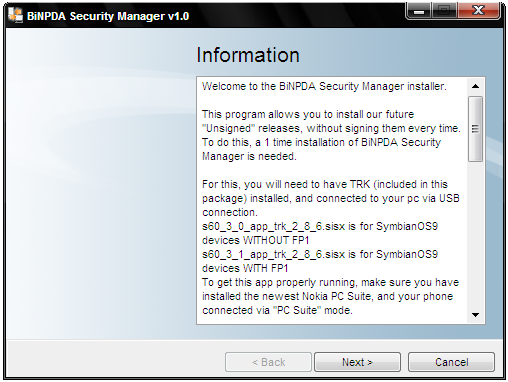
3. Now Run SecMan.exe (attached below), and follow the given instructions and complete the installation to to finally get SecMan on your phone.
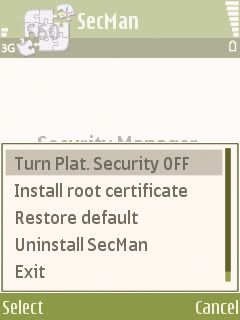
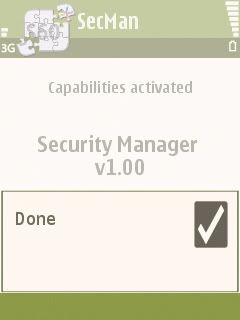
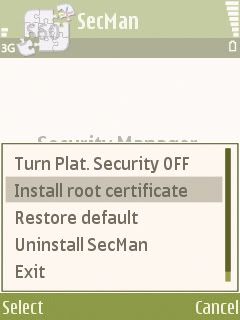
4. Open SecMan on your phone. From options, click on 'Turn Plat. Security Off' to activate this app's capabilities, and also click on 'Install Root Certificate' for later purposes.
Screenshot of SecMan (on PC):
Screenshot of SecMan (on phone)
~~~~~~~~~~~~~~~~~~~~~~~~~~~~~~~~~~~~~~~~~~~~~~~
Section Two: Installing N-Gage 2.0 on your phone.
~~~~~~~~~~~~~~~~~~~~~~~~~~~~~~~~~~~~~~~~~~~~~~~
Now you must install the application to be able to run the games (this is for any OS 9.1/9.2 phones). Let's start:
1. Install the 'SymbianOS.Pipe.s60v3' (attached below) on your phone first.
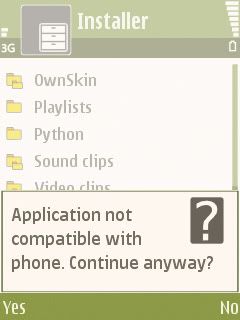
2. Download and install 'NGageInstaller' (check below) on your phone. Say 'Yes" to everything, inclusing messages like "application not compatible with phone" and things like that:
3. Install the patch (attached below) to finally get the BiNPDA game releases to work as full version on your phone.
~~~~~~~~~~~~~~~~~~~~~~~~~~~~~~~~~~~~~~~~~~~~~~~
Section Three: Getting the application to work on non-compatible phones. [+ Landscape mode]
~~~~~~~~~~~~~~~~~~~~~~~~~~~~~~~~~~~~~~~~~~~~~~~
1. Download '20001079' and then extract it. Send the file to your phone.
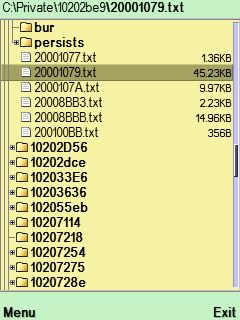
2. Open X-Plore (attached below and can be obtained in app section too) and copy the '20001079' to the following location C:\Private\10202be9\20001079.txt (overwrite for those already having the app and wanting to get landscape mode).
3. Search out the file C:\Private\10202be9\persists\20001079.cre and delete it.
You can now turn Platform Security back on in SecMan. To install a game simple run its exe file, or copy its '*.n-gage' file to the Ngage folder on your phone/memory card.
PS: For phones with s60v3 but other resolution than 240x320 try to edit the file 20001079.txt as follow:
0x00090002 string "nativewidth" 0
0x00090003 int 240 0
0x00090004 string "nativeheight" 0
0x00090005 int 320 0
Here's a complete package containing everything (RS Link):
Code:Code:http://rapidshare.com/files/123112344/Vip_blast_s_NGage_2.0_package.rar
Track Trace or Find Unknown or Missed Call Mobile Number (Cell Phone) Location
 Every person whether male or female directly or indirectly fed up with unknown callers, its easy for every person to afford mobile but its hard to assist any stranger call , Low call rates are also responsible for increase in the number of strange calls .
There are only few services that helps you in detecting unknown cell phone numbers and you can use all these service to trace location of any mobile number without any cost.
Trace Mobile(http://m.vevin.com/mobile/) help you in tracing location of any mobile number in Indian without charging any cost.
Tp2location(http://www.tp2location.com/) Is best for tracing any cell phone number ,They also help you in tracing international mobile number.
Bharatiyamobil(http://trace.bharatiyamobile.com/) service for tracking mobile numbers if you are facing problem in learning all such codes.
Information Madness(http://www.informationmadness.com/cms/index.php?option=com_search_misscall&Itemid=124) for tracking mobile numbers of both India and Pakistan.
Hacktrix(http://www.hacktrix.com/trace-mobile-phone-location-and-service-provider-details/) – You can also try Hacktrix mobile tracing service to trace mobile location.
Hack a cell phone to make free phone calls
Want to control a friend's cell phone remotely and make "free" calls from it? In this hack how-to video, you'll learn how to hack Bluetooth-enabled cell phones with your Sony Ericsson or Nokia phone and the Super Bluetooth Hack—or "BT Info"—, a free program easily found through Google. Once installed, Super Bluetooth Hack will enable you to control your friends' cell phones remotely.
Indeed, with this hack you can do any and all of the following things on your friend's mobile phone:
make calls;
read SMS messages & contacts;
change the phone's default profile;
play ringtones (even if phone is on silent);
play songs;
restart;
shut the phone off;
restore factory settings; and
change the ring volume.
When connecting devices use the code 0000. Don't forget to turn on Bluetooth before starting the application and putting your hacking skills to the test. You'll also have to download the file with Firefox, because Internet Explorer makes it a .zip file.
For more detailed, step-by-step instructions on using Super Bluetooth Hack on your own Sony Ericsson or Nokia phone, take a look!
Indeed, with this hack you can do any and all of the following things on your friend's mobile phone:
make calls;
read SMS messages & contacts;
change the phone's default profile;
play ringtones (even if phone is on silent);
play songs;
restart;
shut the phone off;
restore factory settings; and
change the ring volume.
When connecting devices use the code 0000. Don't forget to turn on Bluetooth before starting the application and putting your hacking skills to the test. You'll also have to download the file with Firefox, because Internet Explorer makes it a .zip file.
For more detailed, step-by-step instructions on using Super Bluetooth Hack on your own Sony Ericsson or Nokia phone, take a look!
Access Free Airtel GPRS Using TeaShark Browser
TeaShark, a mobile browser like Opera Mini, allow you to access Airtel GPRS for FREE.
Shockingly it has nothing to do with modifying any Airtel settings or any kind of hack.
Here is how I used this…
* Download TeaShark v. 312. Its free and being JAR file it can be installed on most handsets.
* Open it from your mobile and select AirTel Live as access point.
* That’s it! Open any site from TeaShark and you won’t be charged anything.
Note for the first time, when TeaShark starts, it may take more than one minute to initialize. Also this one time initialization may fail many times. But don’t loose your heart!
As of now, this trick is limited to handsets only.
Note : “Subscribe to Packet Data First”
This means you need to activate AirTel Live service which is free.
Contact customer care to get it activated.
Also select only AirTel Live as access point when prompted by TeaShark.
Download TeaShark :http://teashark.com/download.html
Subscribe to:
Posts (Atom)